No: the LegacyLauncher project covered by this site does not install or launch the retail Minecraft Bedrock Edition sold through Microsoft. It is a community desktop launcher for Minecraft Legacy Console Edition workflows. Search results often mix it with TL Legacy, Java Edition launchers and an unrelated Bedrock Launcher project, so this guide separates the names before you download anything.
There is no Bedrock APK, Bedrock installer or Bedrock game download on this site.
QUICK VERDICT
Legacy Launcher Bedrock compatibility at a glance
Retail Bedrock support
No — use the official Minecraft Launcher or the platform store tied to your purchase.
Project covered here
gradenGnostic/LegacyLauncher for community Minecraft Legacy Console Edition workflows.
Latest verified release
v3.5.0, published March 12, 2026; the GitHub repository was archived July 13, 2026.
Common name collision
TL Legacy targets Java Edition, while Bedrock Launcher is a separate unofficial project.
NAME CHECK
What people mean by Legacy Launcher Bedrock
The phrase Legacy Launcher Bedrock does not point to one official product. A searcher may be asking whether TL Legacy can open Bedrock, whether this site's LegacyLauncher app can run Bedrock, or whether the separate Bedrock Launcher project is the same download. Those are three different products and three different installation paths.
The icon below belongs to the open-source LegacyLauncher application covered by LegacyLauncher.wiki. Its repository describes a launcher for community Minecraft Legacy Console Edition content; it is not the green official Minecraft Launcher and it is not a Microsoft Store entitlement manager.
Official application icon from the archived LegacyLauncher GitHub repository.COMPATIBILITY MATRIX
Can each launcher run Minecraft Bedrock?
Use the product name and your game ownership as the deciding factors. A launcher cannot convert a Java or community LCE setup into a licensed Bedrock installation. Bedrock availability also depends on platform: Windows, Xbox, PlayStation, Nintendo Switch and mobile editions use their own stores and account rules.
LegacyLauncher LCE projectNo retail Bedrock support
TL Legacy / Java launchersJava Edition workflow, not Bedrock
Official Minecraft LauncherCorrect Windows route when your account owns Bedrock
Unofficial Bedrock Launcher projectSeparate community software; verify its own documentation
WHY RESULTS CONFLICT
LegacyLauncher, TL Legacy and Bedrock Launcher are not the same
LegacyLauncher in this site's download pages is the archived Electron application by gradenGnostic. It organizes community Legacy Console Edition releases and launch settings. TL Legacy is a different Java Edition launcher whose search results often dominate the broader phrase “legacy launcher.” Neither name should be treated as proof of Bedrock support.
A third project uses the descriptive name Bedrock Launcher. Its documentation says it installs and manages Windows Bedrock versions, but it is not Mojang's official launcher and it is unrelated to the LCE application hosted in the GitHub repository linked from this site. Never substitute one project's installer, wiki or safety claims for another project's files.
REAL INTERFACE
What the LegacyLauncher LCE app actually looks like
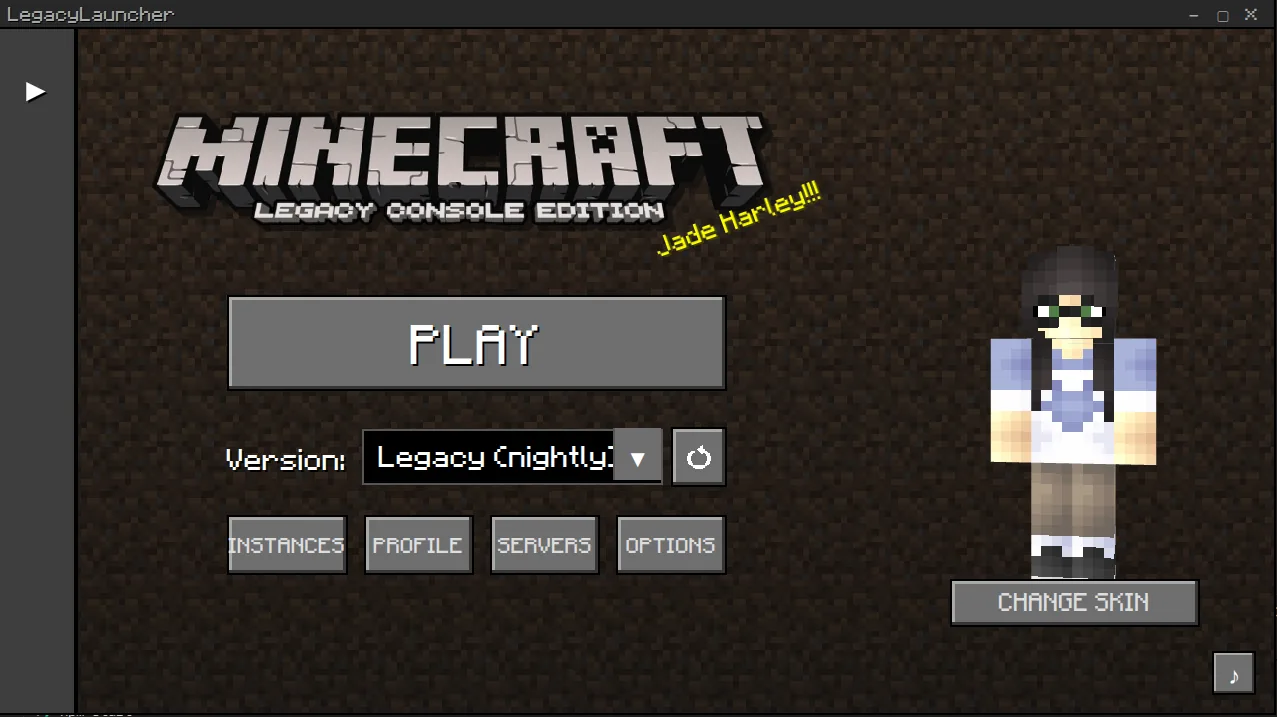
The official README screenshot shows a library-style desktop interface for selecting installed or fetched community content. It does not show the Bedrock Marketplace, Microsoft Store ownership, Xbox platform purchases or the official Minecraft Launcher account flow.
If the application you downloaded shows a different brand, asks for unrelated account credentials, promises a free paid game, or arrives as an Android APK, stop and verify the source. The v3.5.0 release publishes Windows EXE, macOS DMG and Linux AppImage assets — no Bedrock package and no APK.
Official interface screenshot from the LegacyLauncher GitHub README; this is not the Bedrock Marketplace or official Minecraft Launcher.RIGHT DOWNLOAD PATH
How to choose the correct launcher
Start with the edition you already own and the device you want to use. Then follow the official or project-specific source for that exact product. Do not choose a file only because its title contains Minecraft, Legacy or Bedrock.
For retail Bedrock on Windows, use Minecraft's official download page or Microsoft Store and sign in with the account that owns the game.
For Bedrock on a console or phone, use the device's official store; a Windows launcher file cannot replace that purchase.
For Java Edition, use the official Minecraft Launcher or a Java launcher whose documentation matches your intended use.
For community Minecraft LCE workflows, review this site's LCE guide and the archived LegacyLauncher GitHub release before installing.
For an unofficial Bedrock version manager, evaluate that separate project's repository, release history and limitations instead of using this site's LCE downloads.
SOURCE AND SAFETY
Check ownership, source and archived status
LegacyLauncher.wiki does not provide Minecraft game files, accounts, cracks, license bypasses or “free Bedrock” installers. A legitimate launcher does not create ownership of a paid edition. Claims that one EXE or APK unlocks every platform are a strong reason to leave the page.
Version freshness was checked on July 14, 2026. The latest verifiable LegacyLauncher release remains v3.5.0 from March 12, 2026, and its GitHub repository is now read-only after being archived on July 13, 2026. The download facts across this site already match that release, so no version number, file size or release URL required an update for this page.
No. The LegacyLauncher project covered here is for community Minecraft Legacy Console Edition workflows, not the retail Bedrock Edition distributed by Microsoft.
How do I play Bedrock using Legacy Launcher?
You do not use this LCE launcher for retail Bedrock. On Windows, use the official Minecraft Launcher or Microsoft Store with an account that owns Bedrock.
Is TL Legacy the same as this LegacyLauncher app?
No. TL Legacy is associated with Java Edition searches; the app covered by this site is a separate open-source Legacy Console Edition community launcher.
Is Bedrock Launcher the same project?
No. Bedrock Launcher is a separate unofficial Windows project with its own repository and documentation. Its files are not the LegacyLauncher v3.5.0 files listed here.
Can I download a Legacy Launcher Bedrock APK?
No official APK exists for the LCE LegacyLauncher project. Avoid pages that repackage unrelated Android files under the same name.